

WHAT JOEY DOES
Your whole ERP, in one conversation.
Joey isn't just a reporting tool. It answers, acts, sends and explains, across every part of your ERP, signed in as you.
Ask
Live answers
Cash flow, overdue invoices, open orders, stock on hand, sales by month, top customers. Answers, totals and trends from live data, common questions in about a second.
Act
Real changes
Where your company switches it on: create sales orders, purchase orders, customers, leads and cases; release, ship, invoice and approve. Every change is shown first and made only when you confirm. Joey never deletes.
Send
Documents and files
Email invoices and orders with your ERP's own templates, get printed forms, and turn any answer into Excel, Word, PowerPoint, PDF or a chart.
Learn
ERP how-to
"How do I raise a credit note?" Joey answers questions about the ERP itself, with links to the right screen. Great for new starters.
JoeyAI Chat
No AI app? No problem.
JoeyAI Chat is your company's own chat page for Joey. Sign in with your ERP login and start asking: the AI is included. Your company picks JoeyAI Chat or its own AI app, such as Claude, ChatGPT or Copilot, with Atlys.
✓Signed in with your own ERP login, with your own rights
✓The AI is included, with a monthly allowance for your company
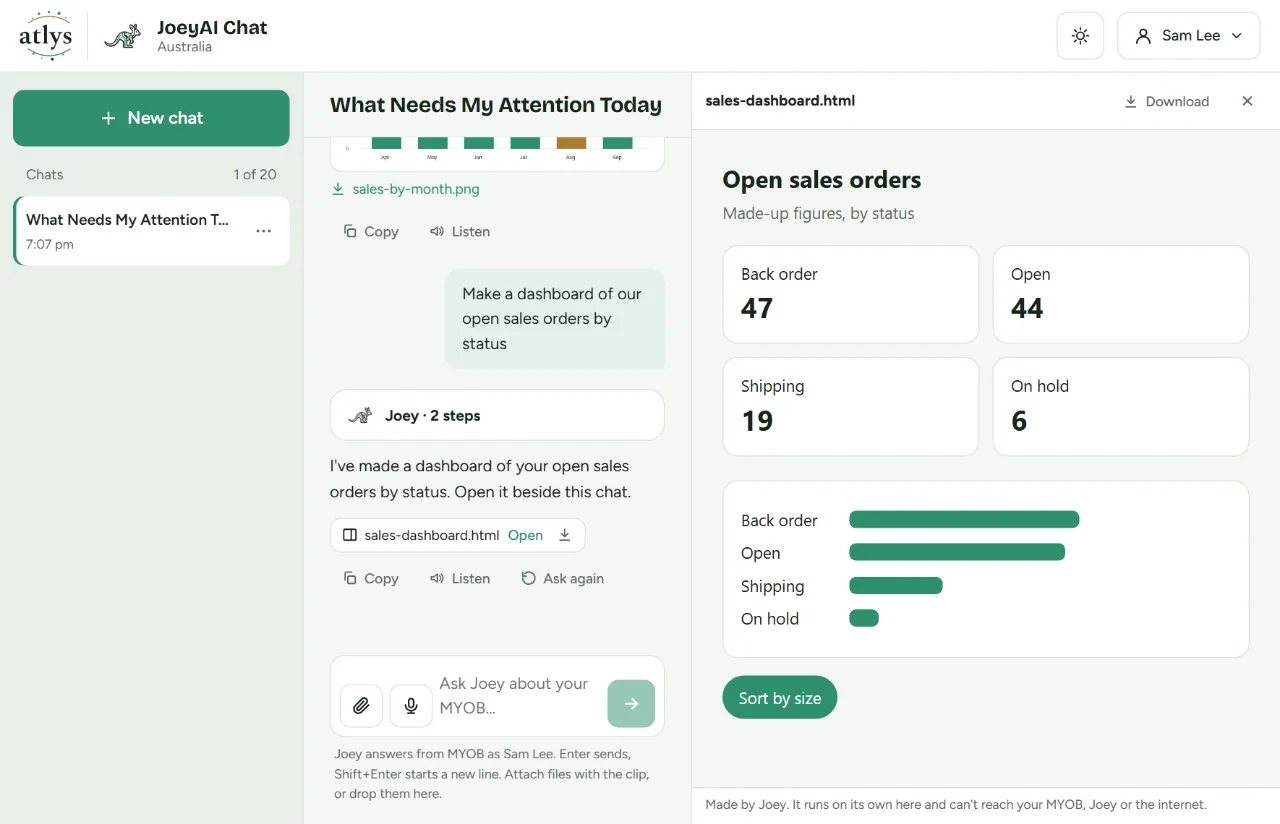
✓Attach pictures, PDFs, Excel, Word, PowerPoint and CSV files; get charts, files and dashboards back
✓Confirm or Cancel on a card for every change, voice in and read-aloud
✓On your phone as the Atlys JoeyAI app, signed in with a code from your computer
✓Your chats are encrypted for you alone and deleted when you sign out, or 30 days after you signed in at the latest
PLAYER SELECT
Which Joey are you?
Six roles, six episodes, one a week. Pick yours and watch Joey answer the question that role asks most. These are just the start: Joey works for every team that uses your ERP.
 Releasing shortly
SalesSpecial move · Walk in ready"Who hasn't ordered in 90 days?"
Who's next?
WHAT YOU CAN DO WITH IT
More than answers. Real work, done in the chat.
Everything your team does in the ERP every day, in plain English, with the ERP's own rules and your approval on every change.
Live answers
Cash flow, overdue invoices, open orders, stock on hand. Straight from your ERP, the moment you ask.
Totals and trends
Sales by month, top customers, ageing, GL balances. Summaries in seconds, without building a report. A vague question gets a suggested period or one short question, not a guess.
Create and update records
Sales orders, purchase orders, customers, leads, cases, notes and activities. Joey shows the before and after; nothing changes until you confirm, and it never deletes.
Actions, even in bulk
Remove hold, release, ship, invoice and approve, the same buttons as on the ERP's screens. Holds, releases, approvals and emails can run on several documents at once.
Emails and printed forms
Email an invoice or order to the customer with the ERP's own template, or get the printed form to check, print or save as a PDF.
Straight to the record
Answers link to the record on its ERP screen, and long lists come back as a table or an Excel or CSV download.
Files in, files out
Attach a picture, a PDF, or an Excel, Word, PowerPoint or CSV file and ask about it. Ask for an Excel, Word, PowerPoint or PDF file, or a chart, and download it.
In JoeyAI ChatDashboards beside the chat
"Make a dashboard of our open orders." It opens in a panel next to the conversation, ready to use.
In JoeyAI ChatTalk to it, anywhere
Speak your question and hear the answer read aloud. On your phone, add JoeyAI Chat to your home screen as the Atlys JoeyAI app.
HOW IT WORKS
Set up once. Use it every day.
No new screens to learn. Use JoeyAI Chat, your company's own chat page, or the AI app your team already has open. Your company picks one with us.
01
We connect it
Atlys sets Joey up on your ERP site, with your company's own Joey address, then switches on JoeyAI Chat or connects Joey to your team's AI app.
02
You ask
Type it the way you'd ask a colleague. Joey reads your live ERP, signed in as you, with the same rights you have today.
03
You get it done
An answer, a file, an email sent or a record updated. Joey shows any change first and makes it only when you approve.
Each person's ERP login needs your ERP's API licence as well as their usual licence and roles (in MYOB Acumatica: Full User (Full API), set by your ERP administrator on the Users screen).
SECURITY AND TRUST
You stay in charge.
Joey works inside the rules your ERP already has.
Signed in as you
Each person signs in with their own ERP login, and your ERP decides what they can see and change at every step. Colleagues can't see each other's questions.
Nothing changes until you say yes
Every change is shown first and made only when you confirm it. Larger or sensitive ones are confirmed on Joey's own page. Joey never deletes, and payroll and pay data are off.
Your company only
Each company has its own Joey address, and one connection reaches one ERP company. The AI doesn't learn your figures.
Set up by ERP specialists
Atlys Tech is MYOB Acumatica certified. We set Joey up, train your team and support it.
What Joey keeps, for how long, and who can see it: how Atlys Joey handles your data.
WORKS WITH
The AI you already use. The ERP you already run.
AI APPS
ERP
Setting it up? Read the Atlys Joey user guide.
Joey is part of what Atlys Tech does: ERP integration, AI and process automation and bespoke ERP engineering.
FAQ
Good questions.
What is Atlys Joey?+
Atlys Joey lets your team work with your live ERP in plain English: ask questions, update records, send documents and get files back, with every change approved first. Use it in JoeyAI Chat, your company's own chat page, or in AI apps such as Claude, ChatGPT and Microsoft Copilot.
Do we need our own AI app?+
No. JoeyAI Chat is your company's own chat page: sign in with your ERP login and start asking, with charts, files and dashboards right in the chat. If your team already uses Claude, ChatGPT, Microsoft Copilot or another AI app, Joey can work there instead. Your company picks one with Atlys.
Which AI apps does it work with?+
JoeyAI Chat, plus Claude, ChatGPT, Microsoft Copilot, Google Gemini, Cursor and other AI apps that support custom connectors. In an AI app, Joey is added as a connector; JoeyAI Chat needs nothing extra.
Which ERPs does it work with?+
Any ERP. Joey is ready for an instant demo on MYOB Acumatica (MYOB Advanced) and Acumatica; for another ERP, ask us.
Can Joey change data in our ERP?+
Only where your company switches write access on, and only when you approve it. Joey shows the change first, before and after, and nothing happens until you confirm. It never deletes, and payroll and pay data are off.
Can colleagues see each other's questions? Does the AI learn our figures?+
No to both. Each person signs in with their own ERP login and has their own private copy of their data and chats, encrypted for them alone. Joey hands the AI the answer to the question asked, like a report you asked for; the AI doesn't learn your company's figures.
Does it work on a phone?+
Yes. JoeyAI Chat installs on your phone's home screen as the Atlys JoeyAI app, no app store needed. Sign in with your ERP login, or with a code or QR from your computer, then press Allow on the computer. In your own AI app, it depends on the app.
Is there zero data retention?+
Yes, Atlys Joey offers zero data retention, subject to your setup and AI provider. Atlys can help you set it up and talk you through what applies to your business. Terms and conditions apply.
Is our ERP data exposed over the internet or made public?+
No, never. Every connection between your ERP, Joey and the AI is encrypted in transit, and the private copy of your data Joey keeps to answer quickly is encrypted for each person alone. Nothing is published or shared: each person sees only what their own ERP login allows.
How long does setup take?+
It depends on your environment: your ERP, your AI apps and how your team works. Contact Atlys and we'll give you a timeline for yours. We set it up, connect your team's AI app and walk your people through it.
Are the figures in the videos real?+
No. Every figure in our videos and demos is sample data. In a demo we can show Joey on your own data.
BOOK A DEMO
See Joey on your own data.
Tell us a little about your team and your ERP. We'll set up a demo and reply within one business day.
admin@atlystech.com.au +61 480 828 047 Monday to Friday, 9 to 5 AEST Prefer to pick a time? Book a call → Need ERP development or integrations as well? See our services →Something went wrong.
Please email us directly at admin@atlystech.com.au and we'll get back to you shortly.